
If you want to know how to automate social media posts, the first thing to understand is that a post goes through three jobs before anyone sees it. Someone decides what to say, someone makes the post, and something publishes it. Most social media automation tools handle the last job well. The first two still sit with you, and those are the two that make most small businesses go quiet after a few weeks.
We run content automation for our own brand and for clients, and we built it because posting by hand kept losing to client work. This guide walks through the three levels of automation, seven steps to set it up, what you should never automate, and the lessons we picked up from running our own system every week.
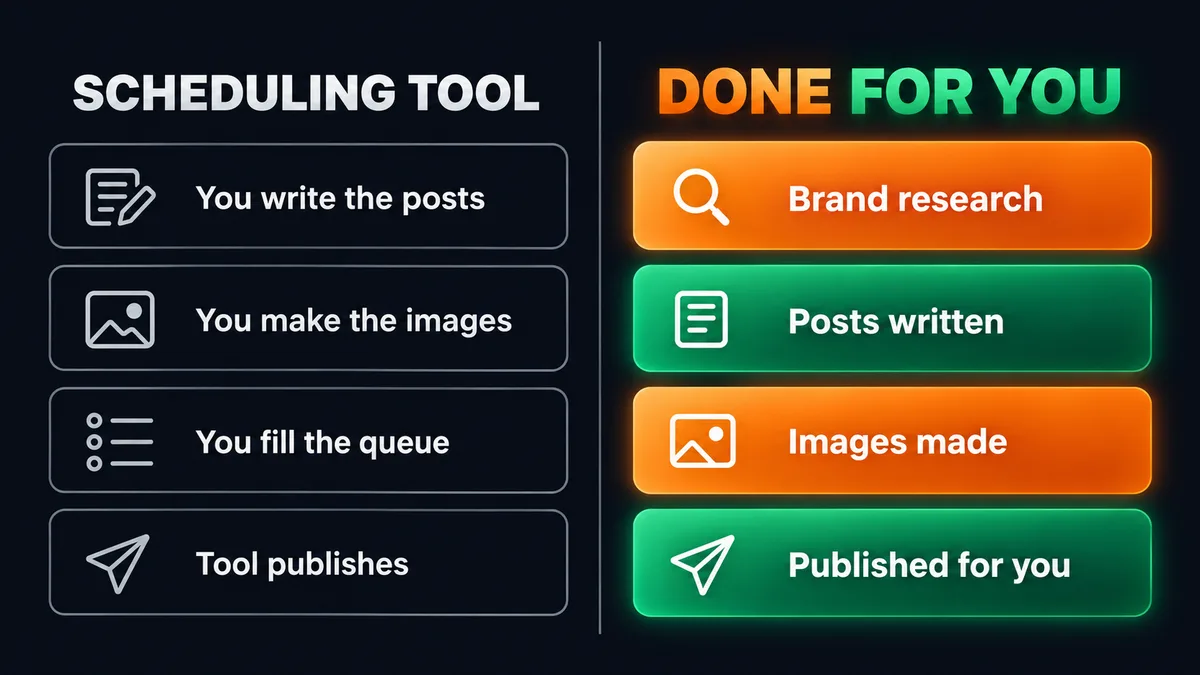
Quick answer: To automate social media posts, you set up a content calendar, write clear rules for how your brand sounds, create posts for each platform separately, and let a scheduler or service publish them on a fixed plan. A scheduling tool only automates the publishing step. A done for you content automation service also handles the research, the writing, and the images, so posts keep going out when you are busy.
What’s covered
- What automating social media posts means
- The three levels of social media automation
- How to automate social media posts in 7 steps
- What you should not automate
- What we learned running our own content automation
- A checklist before you switch it on
- Why steady posting beats big bursts
- What it costs and what to do next
- FAQ
What automating social media posts means
People use the phrase social media automation for very different things. For some it means a calendar app that publishes a post at 9am on Tuesday. For others it means a system that decides what to post, writes it, designs the image, and publishes it without anyone touching it. Both are called automation, and they save very different amounts of time.
It helps to split a single post into its parts:
- The idea. What is this post about, and why would your audience care this week?
- The words. The caption or text, written for the platform it is going on.
- The visual. An image, a carousel, or a graphic that matches your brand.
- The publishing. Putting it live on the right account at the right time.
- The record. Knowing what went out, when, and where to find it.
When you ask how to automate social media posts, you are really asking which of these parts you want to stop doing yourself. A scheduler takes publishing. A good tool setup can take publishing and the record. Only a full content pipeline takes all five.
Most owners we talk to already know consistency matters on social. What stops them is rarely the publish button. It is sitting down every week to think of something worth saying, then writing it, then making an image for it. That is the part that disappears when a busy month arrives.
The three levels of social media automation
There are three common ways to automate social media posts. Each one suits a different kind of business, and each one leaves a different amount of work with you.
Level 1: The platforms’ own schedulers
LinkedIn, Instagram, and Facebook all let you schedule posts inside the app. LinkedIn’s own help page on how to schedule posts explains that you can set a post to publish anywhere from 10 minutes to 3 months ahead, and view everything you have queued in one place.
This costs nothing and works fine for a handful of posts. You still write every post, make every image, and schedule each one by hand, one platform at a time. It moves the publish button to a better time of day. It does not give you any hours back.
Level 2: Social media automation tools
Social media automation tools such as Buffer, Hootsuite, and Later let you schedule posts across several accounts from one calendar. Some add bulk upload from a spreadsheet, a queue that publishes at set intervals, or AI caption suggestions. Workflow tools can go further. Zapier’s guide to social media automation shows how to share new blog posts or RSS items to your accounts automatically.
These tools are useful if you already have content and want to schedule social media posts faster. They do not decide what to say, and AI caption buttons tend to produce the same flat posts everyone else is publishing. You are still the writer, the designer, and the person who keeps the queue full. If the queue runs dry, the tool has nothing to publish.
Level 3: Done for you content automation
At this level, a service runs the whole pipeline: research on your brand, a content calendar, writing for each platform, images in your visual style, and publishing on a schedule. You see what went out on a dashboard, and you can review posts before they go live if you want to.
This is the model we run. It suits owners who know content works but cannot give it a few hours every week. It is less suited to people who enjoy writing every post themselves and only need help with timing.
A scheduler moves the publish button. It does not write a single post for you.
How to automate social media posts in 7 steps
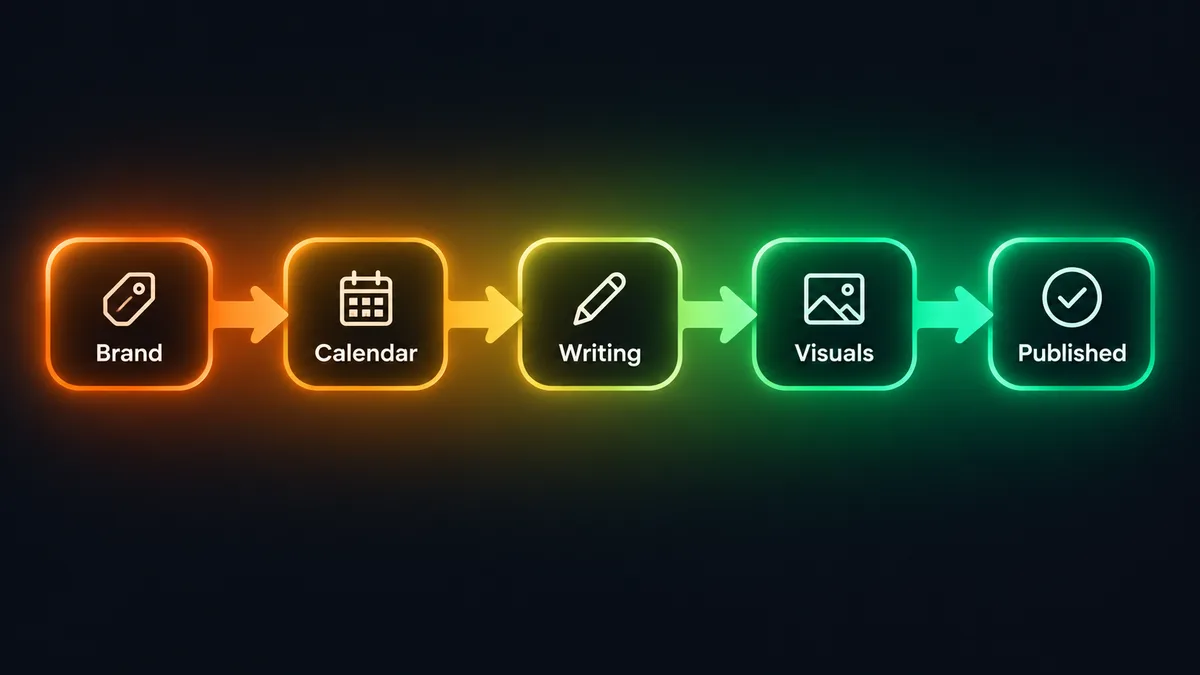
Whether you build this yourself with tools or hand it to a service, the steps are the same. Skipping the early ones is the most common reason automated accounts end up posting content nobody reads.
Step 1: Decide what you want to be known for
Before anything gets automated, write down three or four topics you want your audience to link with your name. A coach might pick client wins, common mistakes, and their method. A small agency might pick process, lessons from projects, and advice for their buyers. Every post should sit under one of these topics. Without them, automation just produces more posts about nothing in particular.
Step 2: Start with one platform
Pick the platform where your buyers already spend time. For most B2B service businesses that is LinkedIn. For businesses that sell to consumers, or rely on visuals, it is often Instagram. Get one platform running well before you add a second. Two half-run accounts do less for you than one account that posts every week.
Step 3: Build a content calendar
A content calendar is a simple plan: which topic goes out on which day, and in which format. Three to five posts a week is a realistic pace for a small business. Mix formats so your feed does not repeat itself: a short text post one day, a carousel another, a single image with a clear point on a third. The calendar is what makes automation possible, because it tells the system what comes next.
Step 4: Write rules for how your brand sounds
This is the step most people skip, and it is why so much automated content reads the same. Write down the words you use and the ones you never use. Note how long your sentences tend to be, whether you use humour, and how you talk to your clients. Then add a list of phrases to avoid. Filler openers, stock motivational lines, and the same hook repeated every day are the fastest way to look automated.
We keep a long list of banned words and banned sentence patterns for our own content and for every client. We also rotate between different types of opening lines, so one week of posts does not all start with a question. We wrote more about this in our post on why AI content sounds generic.
Step 5: Write for each platform separately
Copying the same text to every account is the quickest way to automate social media posts, and the quickest way to make them perform badly. LinkedIn readers accept longer posts with a clear point of view. Instagram captions sit under a visual, so the image carries more of the message and the caption can be shorter. Hashtags work differently on each platform too.
If you want to automate LinkedIn posts and Instagram posts from one system, the system should produce two versions of each idea, not one version pasted twice.
Step 6: Keep your visuals consistent
Your images should look like they come from the same brand every time: the same colours, the same fonts, the same logo placement. If you use AI image generation, lock the fixed parts of the design (your logo, your footer, your handle) instead of asking the image model to redraw them each time. Image models drift. A footer that shifts a little from post to post looks careless across a grid of nine images.
Step 7: Publish on a schedule, with checks
Now the publishing step. Set the schedule from your calendar, connect your accounts, and let the queue run. Add a few simple checks before you trust it: a rule that stops the same post from going out twice, a record of every post with a link to the live version, and a notification when something publishes. These checks matter more than the scheduling itself, because they are what let you stop watching.
The steps that decide whether automated posts get read happen before the scheduler is ever switched on.
What you should not automate
Automation is good at routine publishing. Some parts of social media should stay with a person.
Replies and conversations
When someone comments on your post or sends you a message, answer it yourself. People can tell when a reply is automated, and a canned response to a genuine question does more harm than a slow reply. Automated posting brings people to your profile. The conversation after that is yours.
Moments that need a pause
A scheduled promotional post can look tone deaf if it goes out during a local or global tragedy. Zapier’s guide makes the same point, and it is good advice for any setup. Know how to pause your queue quickly, and make sure whoever runs your automation can pause it the same day you ask.
Claims about your results
Automated content should never invent numbers, client names, or outcomes. If a post says you helped a client double their bookings, that has to be true and approved by you. Give your system a clear rule: no figures that are not in your own approved material. We apply the same rule to the images, since image models like to fill empty space with made up statistics.
Timely opinions
A post reacting to news in your industry works best when you write it that day. Leave room in your calendar for a few of these, and let automation handle the steady base of posts underneath.
What we learned running our own content automation
Our Content Automation service started as an internal system for our own brand. It posts to Instagram, both feed and Story, and to LinkedIn, on a weekly batch. Running it every week taught us more than any tool comparison could, and most of the lessons were about what goes wrong once nobody is watching.
Timers are less reliable than you expect
Early on, posting depended on a timer running inside the system, and posts sometimes did not go out when they should have. We redesigned it so publishing is started by a separate, dedicated schedule instead. Since then it has posted on time without us checking. If you build your own setup, test what happens when your computer sleeps, restarts, or loses its connection.
Duplicate posts happen more than you think
At one point, two parts of the system nearly published the same content twice. A safeguard caught it before it went live. Every setup we run now checks what has already been published before it posts anything new. A duplicate post is a small thing on its own, but it is exactly the kind of mistake that tells your audience nobody is minding the account.
Fixed design parts belong in code
The footer on our generated images drifted slightly between posts, because the image model redrew it each time. We fixed it by adding the footer in code after the image is made, so it is identical on every post. That is the source of Step 6 above.
Automation is only hands off once the failure cases are handled, not when the first post goes out.
All three of these problems are fixed and have not come back. We mention them because anyone setting up automated posting will meet some version of them, and it is better to plan for them than to find them on your live feed.
A checklist before you switch it on
Use this list whether you are building your own setup or handing it to a provider.
- Topics written down. Three or four themes every post fits under.
- One platform chosen first. The one where your buyers already spend time.
- A content calendar for at least four weeks. Topics, days, and formats.
- Brand voice rules on paper. Words you use, words you never use, and banned phrases.
- Separate versions per platform. No identical text pasted across accounts.
- Locked visual elements. Logo, colours, fonts, and footer fixed, not redrawn.
- Duplicate protection. A check that nothing publishes twice.
- A live record. A list or dashboard showing every published post with its link.
- A pause option. A way to stop the queue within the same day.
- A review choice. Decide whether you want to approve posts first or let them publish on their own.
If you cannot tick most of these, automating now will just produce more of the same posts faster. Fix the early items first.
Why steady posting beats big bursts
Most small business accounts follow the same pattern. A burst of posts during a quiet month, then nothing for six weeks once client work picks up, then another burst. Followers who find you during a quiet stretch see a profile that looks abandoned.
A steady pace of three to five posts a week fixes that. People who look you up after a conversation, a referral, or an outreach message find recent posts that explain who you help and how. That is the main job social content does for a service business: it makes the rest of your sales work easier. It is also why we pair content with outreach. If you run done for you LinkedIn outreach, prospects will check your profile before they reply, and an active feed makes that reply more likely.
Across H3A we have delivered 300+ projects and built 30+ automations. The lesson that repeats is that owners rarely need more channels. They need the channel they already know works to keep running when they are busy. For a wider view of which marketing tasks to automate first, see our guide to marketing automation for small businesses.
What it costs and what to do next
If you want to build it yourself, start with the checklist above, a free platform scheduler, and a few hours a week to write. If you want the whole pipeline handled, our Content Automation service researches your brand, writes platform-specific posts, makes the visuals, and publishes 3 to 5 posts a week to Instagram, LinkedIn, or both. The prices are published:
- $299 one time setup
- $149 per month for one platform (Instagram or LinkedIn)
- $50 per month more for the second platform, so $199 per month for both
- $29 per month for WhatsApp notifications when a post goes live, if you want them
There is no long term contract, and there is a 7 day trial with a full refund if you are not satisfied. You get a dashboard that shows every post and a link to it on the live account. Reviewing posts before they publish is optional.
Content works best alongside outreach. Our Social Outreach Automation handles LinkedIn and Instagram prospecting, and Email Outreach Automation reaches buyers by email. If you want all three, the Growth Bundle combines them for $499 setup and $349 per month.
FAQ
How do I automate social media posts for free?
Use the built-in schedulers on LinkedIn, Instagram, and Facebook, or the free tier of a scheduling tool. You will still write and design each post yourself. Free options automate the timing, not the content.
Is it safe to automate LinkedIn posts?
Scheduling your own posts is a normal feature, and LinkedIn offers it in its own app. The risk on LinkedIn comes mostly from automated messaging and connection requests sent in large bursts, not from publishing your own posts on a schedule.
Will automated posts sound like AI wrote them?
They will if the only instruction is “write a post about X.” Brand voice rules, a banned phrase list, varied opening lines, and separate writing per platform make the difference. That is what our Content Automation is built around.
How many posts a week should I automate?
Three to five posts a week is a pace most small businesses can keep up with automation, and it is what our service publishes. Posting more often only helps if the quality stays the same.
Can I review posts before they go live?
With our service, yes. It runs on its own by default, and you can choose to review the queue before posts publish if you want that extra control.
What is the difference between a scheduler and content automation?
A scheduler publishes posts you have already written and designed. Content automation covers the research, the writing, the images, and the publishing, so the queue fills itself.
Learning how to automate social media posts is mostly about deciding which jobs you want off your plate. If you only need better timing, a scheduler is enough. If the writing and the images are what keep your account quiet, hand off the whole pipeline and keep the replies and the conversations for yourself. You can see exactly how our service works and what it costs on the service page.